
SEO
Technical SEO vs On-Page SEO: What Does Your Website Actually Need?
You can have perfect on-page content on a page Google can't crawl, and perfect technical health on a page with nothing worth ranking. Here's how the two actually differ, and where to look first.
The short answer
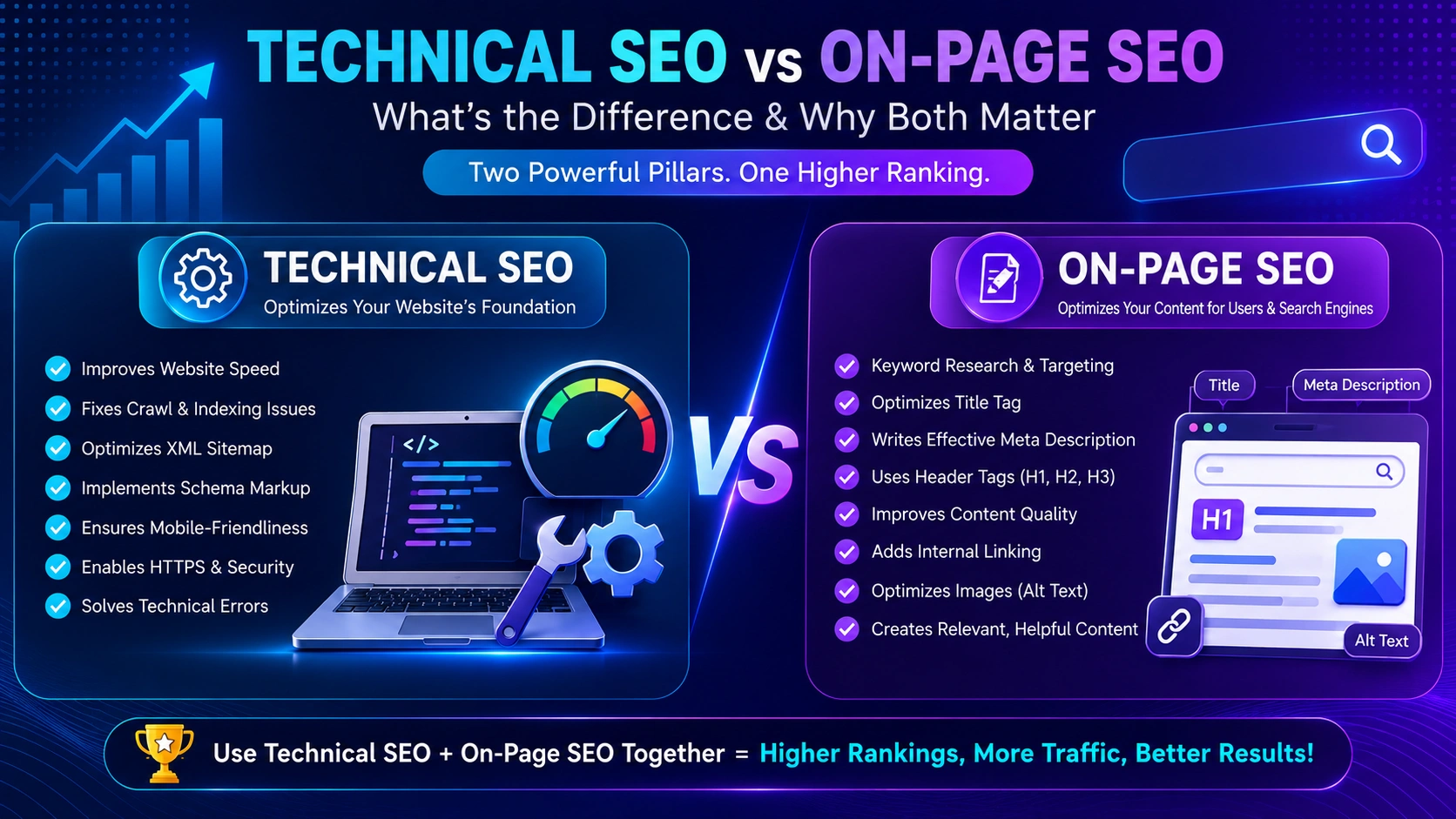
Technical SEO and on-page SEO solve two different problems, and a website generally needs both to rank well. Technical SEO is about whether Google can find, crawl, index, and properly render your pages in the first place — site structure, page speed, mobile usability, and error-free status codes. On-page SEO is about whether an already-indexed page is relevant and useful enough to rank for what someone is searching — headings, content quality, internal linking, and metadata. A page can fail for either reason independently, which is why diagnosing “why isn’t this ranking” requires checking both.
What technical SEO actually covers
Per Google’s own documentation on crawling and indexing, Google only indexes pages that are publicly accessible, not blocked from its crawler, and served with a successful HTTP status code. Technical SEO is the work that keeps those conditions true and efficient at scale:
- Crawlability — making sure robots.txt, redirects, and site structure don’t accidentally block Google from reaching important pages.
- Indexability — clean canonical tags, no unintentional “noindex” directives, and no duplicate content confusing which version should rank.
- Site speed and Core Web Vitals — how quickly and smoothly pages load and respond, which is directly tied to SEO performance.
- Mobile usability — since Google’s indexing is mobile-first, a site that renders or functions poorly on mobile is at a structural disadvantage.
- Site architecture — logical URL structure and internal linking that helps both users and crawlers understand how pages relate to each other.
What on-page SEO actually covers
On-page SEO is about the content and structure of an individual page once it’s already crawlable and indexable:
- Search intent match — does the page actually answer what someone searching that term wants to know?
- Headings and structure — clear H1/H2/H3 hierarchy that both organizes content for readers and helps search engines understand it.
- Content depth and clarity — genuinely useful, specific content rather than thin or generic copy.
- Metadata — title tags and meta descriptions that accurately represent the page and encourage a click.
- Internal linking — connecting related pages in a way that distributes relevance and helps users navigate.
How to tell which one your site actually needs
| Symptom | Likely cause |
|---|---|
| Pages missing from Google’s index entirely | Technical (crawl or indexing issue) |
| Site loads slowly or fails mobile checks | Technical (speed, Core Web Vitals) |
| Pages are indexed but rank poorly for relevant terms | On-page (content, structure, intent match) |
| High bounce rate on relevant, well-ranked pages | On-page (content doesn’t match what was promised) |
| Duplicate or near-identical pages competing with each other | Technical (canonicalization) |
A full SEO audit checklist is the most reliable way to check both categories systematically rather than guessing which one applies.
Why the order matters
Technical SEO issues should generally be resolved first, because they can make on-page work irrelevant. Per Google’s documentation on how Search works, pages are found and indexed through crawling before anything about their content is ever evaluated for ranking — so a beautifully optimized page that Google can’t crawl or index isn’t in the running at all. Once a page is reliably indexed, on-page improvements are what move it from “present” to “actually ranking well.”
Common mistakes
- Rewriting content repeatedly while an underlying technical issue (like an accidental noindex tag) keeps the page out of the index entirely.
- Ignoring site speed because it “seems fine” on a fast personal connection, without testing real-world mobile performance.
- Treating on-page SEO as just keyword placement, rather than genuinely matching search intent and providing real depth.
- Never checking Search Console, which is the most direct signal of what Google can actually see and index on your site.
The bottom line
Technical SEO gets your pages into the game; on-page SEO determines how well they perform once they’re in it. Neither replaces the other — a technically flawless site with thin, unhelpful content won’t rank well, and beautifully written content trapped behind a crawl error won’t be seen at all. Check technical health first, since it can silently block everything else, then invest in on-page quality to actually compete once your pages are reliably indexed.
Frequently asked questions
Which matters more, technical SEO or on-page SEO?
Neither works without the other. Technical SEO determines whether Google can find, crawl, and index your pages at all — if that's broken, on-page quality is irrelevant because the page may never be evaluated. On-page SEO determines whether an indexed page is actually relevant and useful enough to rank. A site needs both working correctly, not one traded off against the other.
How do I know if I have a technical SEO problem?
Common signs include pages not appearing in Google's index despite being live, unusually slow load times, broken internal links, or duplicate content issues. Google Search Console's coverage and page-experience reports are the most direct way to check, since they reflect what Google itself sees on your site.
Is site speed technical SEO or on-page SEO?
Site speed is generally considered technical SEO, since it relates to how efficiently your site is built and served rather than the content or structure of an individual page. It has a documented relationship to both user experience and Google's page-experience signals.
Can good content make up for technical SEO problems?
Only up to a point. If Google can't crawl or index a page — for example, if it's accidentally blocked in robots.txt or returns an error status code — no amount of content quality matters, because the page isn't eligible to appear in search results at all.
Do small websites need to worry about technical SEO?
Yes, though usually to a lesser degree than large, complex sites. Even a small site can have crawl-blocking errors, broken links, slow load times, or duplicate content — issues worth checking even on a handful of pages, since they can quietly suppress rankings without any obvious symptom.
More insights

SEO
SEO Audit Checklist for Businesses: 25 Things to Check Before Hiring an Agency
Most businesses hire an SEO agency without knowing what's actually broken. A basic audit before that conversation changes the entire negotiation — here's exactly what to check.
Read Article
SEO
Core Web Vitals and SEO: How Website Speed Affects Google Rankings
Core Web Vitals aren't an abstract technical score — they're Google's attempt to measure whether your site actually feels fast and stable to a real visitor.
Read Article
SEO
How to Do Keyword Research for a Business Website: Complete 2026 Guide
The keyword with the most search volume is rarely the one worth targeting first. Here's a practical, non-inflated approach to keyword research for a real business.
Read Article